

How to Update Your Conan Exiles Dedicated Server to Unreal Engine 5 (UE5)
On May 5th, Conan Exiles received a major update upgrading the game from Unreal Engine 4 (UE4) to Unreal Engine 5 (UE5).
This free update, known as Conan Exiles Enhanced, significantly improves graphics, performance, and introduces several quality-of-life improvements.
You can read the full list of changes in the official announcement here: Official Conan Exiles UE5 Update News.
Important Notes Before Updating
- A large number of mods are not compatible with the UE5 update and may never be updated. If you are unsure whether your mods are compatible, do not update your server.
- Updating without checking compatibility will break your server and may corrupt your world.
- Check all installed mods for UE5 compatibility before proceeding, if in doubt, delay the update until your setup is confirmed to be safe.
Save Compatibility (UE4 to UE5)
Exiled Lands
Exiled Lands save files are compatible with the UE5 version of Conan Exiles Enhanced. Your characters, structures, and progress will carry over after updating.
Even though the data is compatible, it is strongly recommended to create a backup before updating.
Isle of Siptah
Isle of Siptah is not supported as a standalone map in Conan Exiles Enhanced. All gameplay is now tied to the Exiled Lands.
Because of this, existing Isle of Siptah servers cannot be transferred directly to UE5. A fresh Exiled Lands database is required.
Players can transfer their characters using the official transfer tool: Character Transfer Tool Guide
- Characters will retain level, progress, inventory, and followers.
- Bases and any placed world structures will not transfer.
- To preserve materials, dismantle your base and store items in followers before transferring.
How to Update Your Server to UE5
- Only proceed if all your mods are confirmed compatible with UE5.
- If you are unsure, do not update your server yet.
- Stop your server.
- Go to the Steam Update section in your control panel.
- Start your server.
How to Stay on the UE4 Version
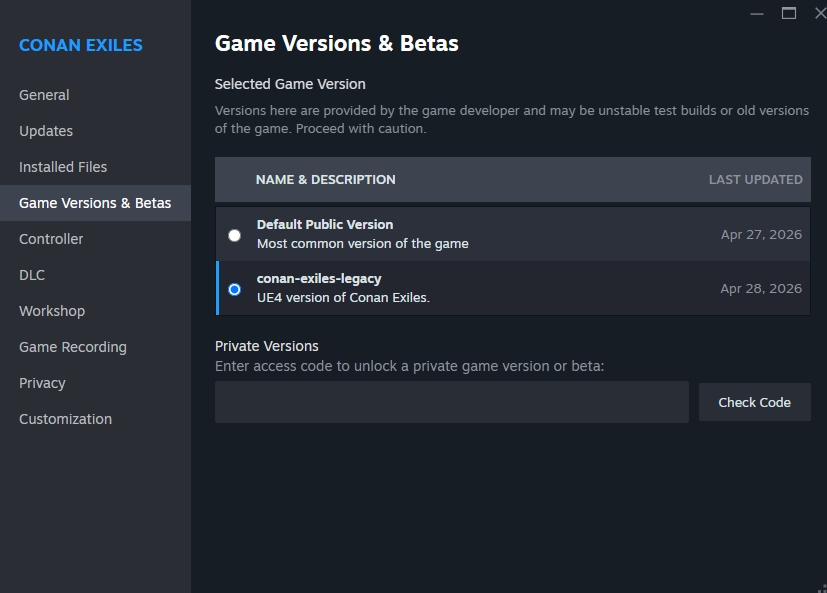
If your mods are not yet compatible with UE5, you should remain on the UE4 version to avoid breaking your server. To switch to the legacy UE4 Branch in the game panel please open a ticket from your billing area requesting so.
- Do not update your server to UE5.
- Open Steam.
- Right-click Conan Exiles and go to Properties.
- Go to the Betas tab.
- Select the conan-exiles-legacy version.
Final Thoughts
The UE5 update brings major improvements, but it also introduces compatibility risks, especially for modded servers.
If your server relies on mods, the safest approach is to wait until all mods are confirmed compatible before updating.


