

How to Set Up Discord Notification Messages on Your DayZ Server
Discord notifications allow you to automatically send messages to your community whenever important events occur on your DayZ server, such as scheduled restarts, Workshop mod updates, Steam server updates, server start, server crash, and more!
You can fully customize the notifications by adding your community logo, choosing the embed color, editing the message text, and configuring which events are sent to Discord. All you need is a Discord webhook connected to one of your Discord channels.
This guide explains how to generate a Discord webhook, connect it to your server, and customize your notification messages.
Important Tips
Important Tips
- You can use all supported Discord Markdown formatting, including bold, italic, underline, and more. See the official guide: Discord Markdown Formatting.
- You can use the {num_mods} placeholder to display the number of Workshop mods waiting to be updated.
- Set the Scheduled Restart Interval value to match your restart schedule so Discord notifications can correctly display the next scheduled restart time.
- If you use a custom notification image, we recommend using a 100 × 100 pixel image. Upload it to an image hosting service such as Imgur and use the direct image URL.
Supported Notification Events
Discord notifications are supported for the following scheduled tasks:
How to Generate a Discord Webhook
- Open your Discord server and right-click the channel where you want to receive notifications.
- Select Edit Channel.
- Open the Integrations tab.
- Click Create Webhook.
- Give the webhook a name and avatar if desired.
- Click Copy Webhook URL.
How to Add the Webhook to Your Server
- Go to the Service Settings button.
- Enable the Discord Notifications option.
- Paste your webhook into the Discord Webhook URL field.
- Click Execute to save your changes.

How to Configure Discord Notification Options
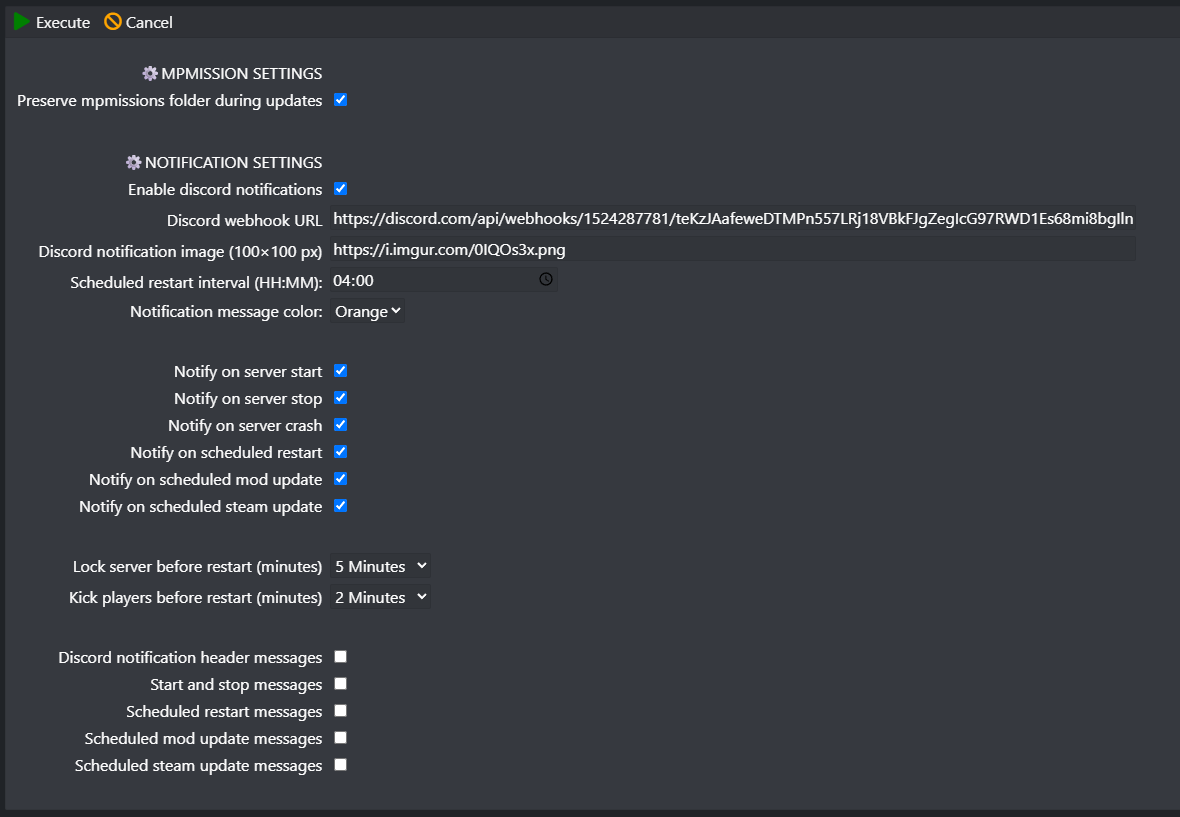
You can choose which notification types are sent to Discord and customize the appearance of each notification.
- Go to the Service Settings button.
- Enable Discord Notifications if it is not already enabled.
- Configure the available notification options as required.
- Click Execute to save your changes.
How to Customize Discord Header Messages
You can customize the title and header text shown in your Discord notifications for each supported event.
- Go to the Service Settings button.
- Enable the Discord Notification Header Messages option.
- Edit the header messages as desired.
- Click Execute to save your changes.

The header messages support all Discord Markdown formatting, along with the {num_mods} placeholder for Workshop update notifications.
Final Thoughts
Discord notifications are a great way to keep your community informed about scheduled restarts, Workshop updates, and server updates without requiring players to be in-game. By customizing the notification messages and appearance, you can provide clear and professional updates directly in your Discord server.
Rent a DayZ Server Today
Ready to host your own DayZ server? Deploy your server in minutes with automatic updates, scheduled tasks, full FTP access, mod support, and powerful management tools.
View DayZ Server Hosting Plans
Want your restarts, updates and backups to run on their own? Our DayZ server setup guide walks through the whole server in one place, from serverDZ.cfg and admin tools to mods, maps and restarts, and lists every DayZ article in this knowledge base by topic.


