

How to Manually Shut Down or Restart Your DayZ Server with Warning Messages
If you need to manually restart or shut down your DayZ server to apply updates, install mods, or perform maintenance, you can do so while automatically notifying connected players with configurable in-game warning messages.
The maintenance task provides countdown warnings before the server is shut down or restarted, giving players enough time to prepare and safely disconnect.
Important Tips
Important Tips
- This maintenance task sends warning messages to players in-game only. Discord notifications are available only with the scheduled restart and update tasks.
- If you change the execution timer, remember to adjust the server lock time, player kick time, and any warning messages that mention those actions.
Warning Message Schedule
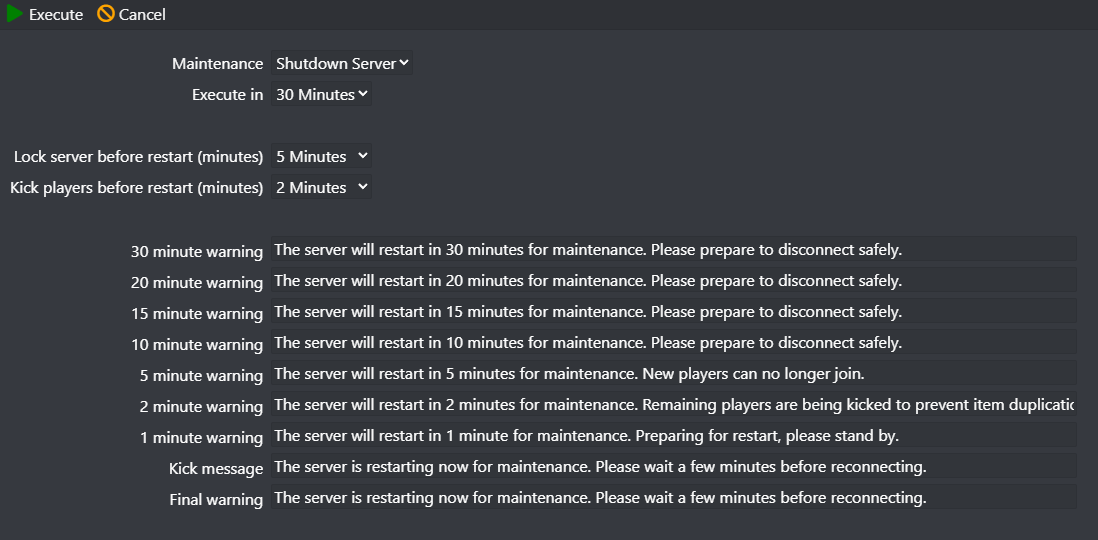
The warning messages sent to players depend on the countdown timer you select when running the maintenance task.
| Execution Timer | Warning Messages Sent |
|---|---|
| 30 Minutes | 30, 20, 15, 10, 5, 2, 1, 0 Minutes |
| 15 Minutes | 15, 10, 5, 2, 1, 0 Minutes |
| 10 Minutes | 10, 5, 2, 1, 0 Minutes |
| 5 Minutes | 5, 2, 1, 0 Minutes |
How to Run a Maintenance Shutdown or Restart
- Click the More button next to the Start and Stop controls.
- Select Maintenance Shutdown or Maintenance Restart.
- Configure the execution timer, warning messages, and other available options as desired.
- Click Execute to start the maintenance task.
Final Thoughts
The maintenance shutdown and restart task provides a safe way to perform manual server maintenance while giving players advance notice before the server goes offline. Using warning messages helps minimize interruptions and gives everyone time to prepare before the restart or shutdown begins.
Rent a DayZ Server Today
Ready to host your own DayZ server? Deploy your server in minutes with automatic updates, scheduled tasks, full FTP access, mod support, and powerful management tools.
View DayZ Server Hosting Plans
Want your restarts, updates and backups to run on their own? Our DayZ server setup guide walks through the whole server in one place, from serverDZ.cfg and admin tools to mods, maps and restarts, and lists every DayZ article in this knowledge base by topic.


