

This guide will help you on how to setup automatic Graceful Restart and messages on your Dayz Standalone server.
This scheduled task will send a warning message at 10 minutes / 5 Minutes / 2 Minutes / 1 Minute, it will lock the server at the 2 Minutes messages to avoid item duping, will kick all players and restart the server.
- Go to the Scheduled Tasks tab in your Control Panel
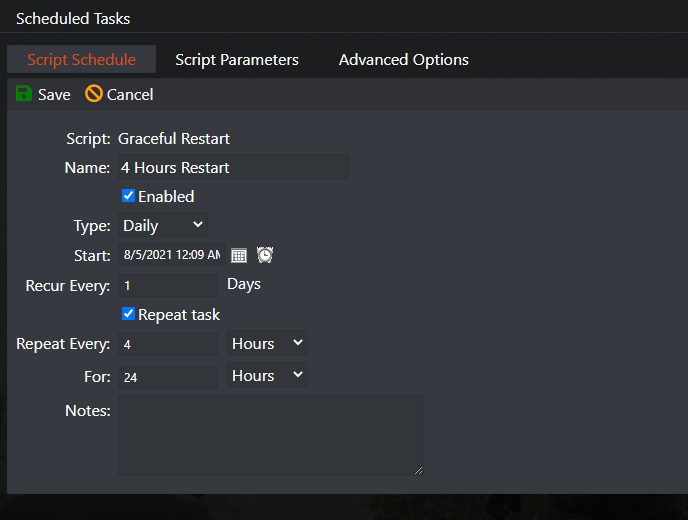
- Create a new Scheduled Task and select the Graceful Restart and Messages option
- Give it a name of your choice, 4 Hour Restart for example
- Select the date/hour you want to next restart will happen(*)
- Select Recur Every 1 Days
- Select Repeat task option
- Select Repeat Every 4 hours
- Select For 24 Hours
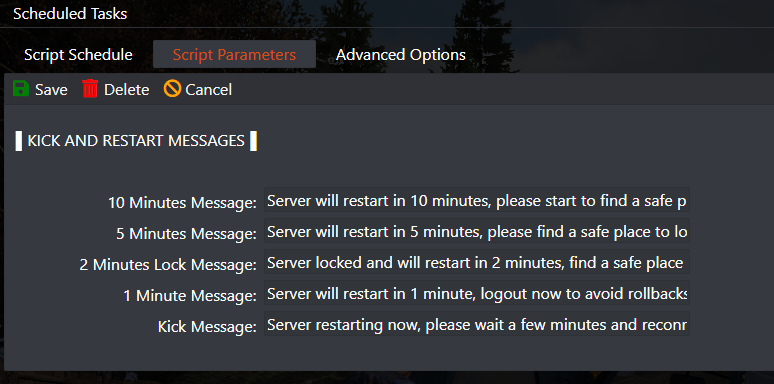
- Select the Script Parameters tab on top and adjust the messages if you want
- Save the task
4 HOURS RESTART EXAMPLE
CHANGE THE PREDEFINED MESSAGES IF YOU WANT
(*) Servers restarted based on the machine local hour, you can view the machine local hour under Server Details > Machine Local Time button, if needed adjust your game panel profile timezone to match clicking on your name on top right corner > My Profile then Timezone.
In this example it will restart your server every 4 hours, if you want any other number of hours, just change the Repeat Every 4 hours to any number of hours of your choice.
Want your restarts, updates and backups to run on their own? Our DayZ server setup guide walks through the whole server in one place, from serverDZ.cfg and admin tools to mods, maps and restarts, and lists every DayZ article in this knowledge base by topic.


