
This guide will help you on how to setup automatic Graceful Restart and messages on your Dayz Standalone server.
This scheduled task will send a warning message at 10 minutes / 5 Minutes / 2 Minutes / 1 Minute, it will lock the server at the 2 Minutes messages to avoid item duping, will kick all players and restart the server.
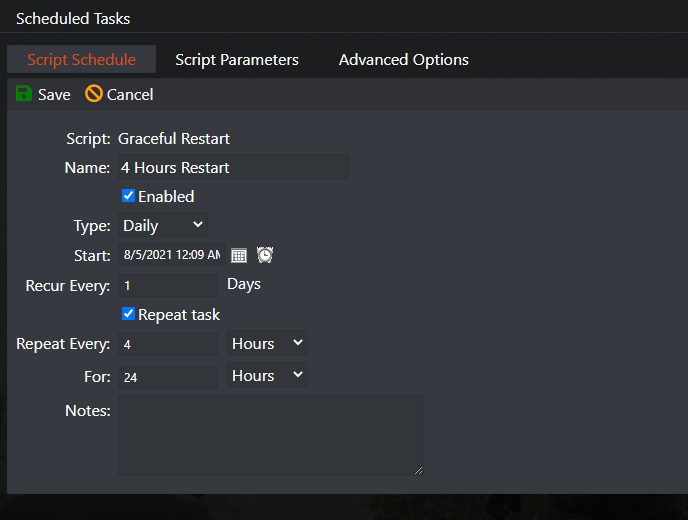
- Go to the Scheduled Tasks tab in your Control Panel
- Create a new Scheduled Task and select the Graceful Restart and Messages option
- Give it a name of your choice, 4 Hour Restart for example
- Select the date/hour you want to next restart will happen(*)
- Select Recur Every 1 Days
- Select Repeat task option
- Select Repeat Every 4 hours
- Select For 24 Hours
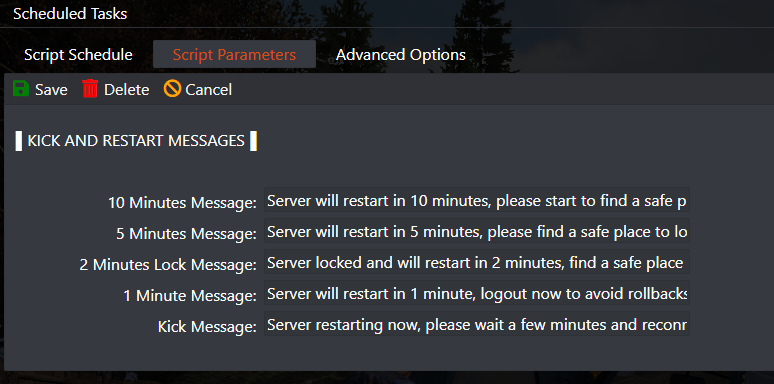
- Select the Script Parameters tab on top and adjust the messages if you want
- Save the task
4 HOURS RESTART EXAMPLE
CHANGE THE PREDEFINED MESSAGES IF YOU WANT
(*) Servers restarted based on the machine local hour, you can view the machine local hour under Server Details > Machine Local Time button, if needed adjust your game panel profile timezone to match clicking on your name on top right corner > My Profile then Timezone.
In this example it will restart your server every 4 hours, if you want any other number of hours, just change the Repeat Every 4 hours to any number of hours of your choice.


