This guide will help you how to change the map on your Path of Titans server.
# HOW TO CHANGE TO GONDWA MAP
- Stop your server
- Go to the Configuration Files button and edit the Game.ini file with TEXT EDITOR option
- Change the ServerMap= line to ServerMap=Island Save & Exit the file at the end.
- Start your server
# HOW TO CHANGE TO PANJURA MAP
- Stop your server
- Go to the Configuration Files button and edit the Game.ini file with TEXT EDITOR option
- Change the ServerMap= line to ServerMap=Panjura Save & Exit the file at the end.
- Start your server
# HOW TO CHANGE TO CERULEAN ISLAND MAP
- Stop your server
- Go to the Configuration Files button and edit the Game.ini file with the TEXT EDITOR option
- Change the ServerMap= line to ServerMap=CeruleanIsland Save & Exit the file at the end.
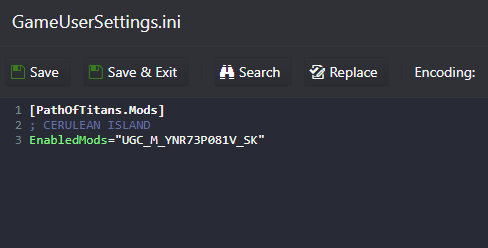
- Now edit the GameUserSettings.ini file and add the ModID line EnabledMods="UGC_M_YNR73P081V_SK" as the example below, Save & Exit the file at the end.